.png)
How to use the Dropcontact API key?
Automate B2B email enrichment with Dropcontact API
Your Dropcontact API key unlocks powerful automation possibilities. Connect Dropcontact to your favorite tools and workflows to automatically find, enrich, and verify B2B emails and contact data.
Whether you're enriching leads from web forms, syncing data across platforms, or building custom prospecting workflows, the API lets you integrate Dropcontact's email finder and data enrichment capabilities directly into your existing stack.
Where to find your Dropcontact API key
Your personal API key is available in your Dropcontact account:
- Log in to Dropcontact
- Go to the Integrations & API section
- Copy your API key with one click

🔒 Keep your API key secure; it's your authentication credential for all API requests.
Connect Dropcontact with no-code automation platforms
You don't need to be a developer to use Dropcontact's API. Popular automation platforms make it easy to connect Dropcontact with your tools:
How to integrate Dropcontact with Zapier
Zapier lets you create thousands of automated workflows (called Zaps) connecting Dropcontact with 5,000+ apps. Perfect for non-technical users who want to automate repetitive tasks without coding.
Common Zapier + Dropcontact use cases:
- Enrich leads automatically when they submit a Typeform, Calendly, or HubSpot form
- Find and verify emails when adding contacts to your CRM
- Update Google Sheets with verified contact data in real-time
📘 Learn more: Dropcontact x Zapier integration
Automate email enrichment with Make
Make offers more advanced visual automation with powerful routing, filtering, and transformation capabilities. Great for complex workflows that need conditional logic.
Common Make + Dropcontact use cases:
- Build multi-step prospecting sequences
- Enrich contacts from LinkedIn scrapers before adding to email campaigns
- Sync enriched data across multiple platforms simultaneously
📘 Learn more: Find B2B emails with Make and Dropcontact
Self-hosted workflow automation with n8n and Dropcontact
n8n is an open-source, self-hosted workflow automation tool. Perfect for technical teams who want full control over their data and infrastructure.
Common n8n + Dropcontact use cases:
- Self-hosted automation workflows with complete data privacy
- Custom sales automation with unlimited complexity
- Integration with internal tools and databases
📘 Learn more: Boost your Sales Automation Workflows with n8n
Best tools to combine with Dropcontact API
Maximize your prospecting efficiency by combining Dropcontact with these complementary tools:
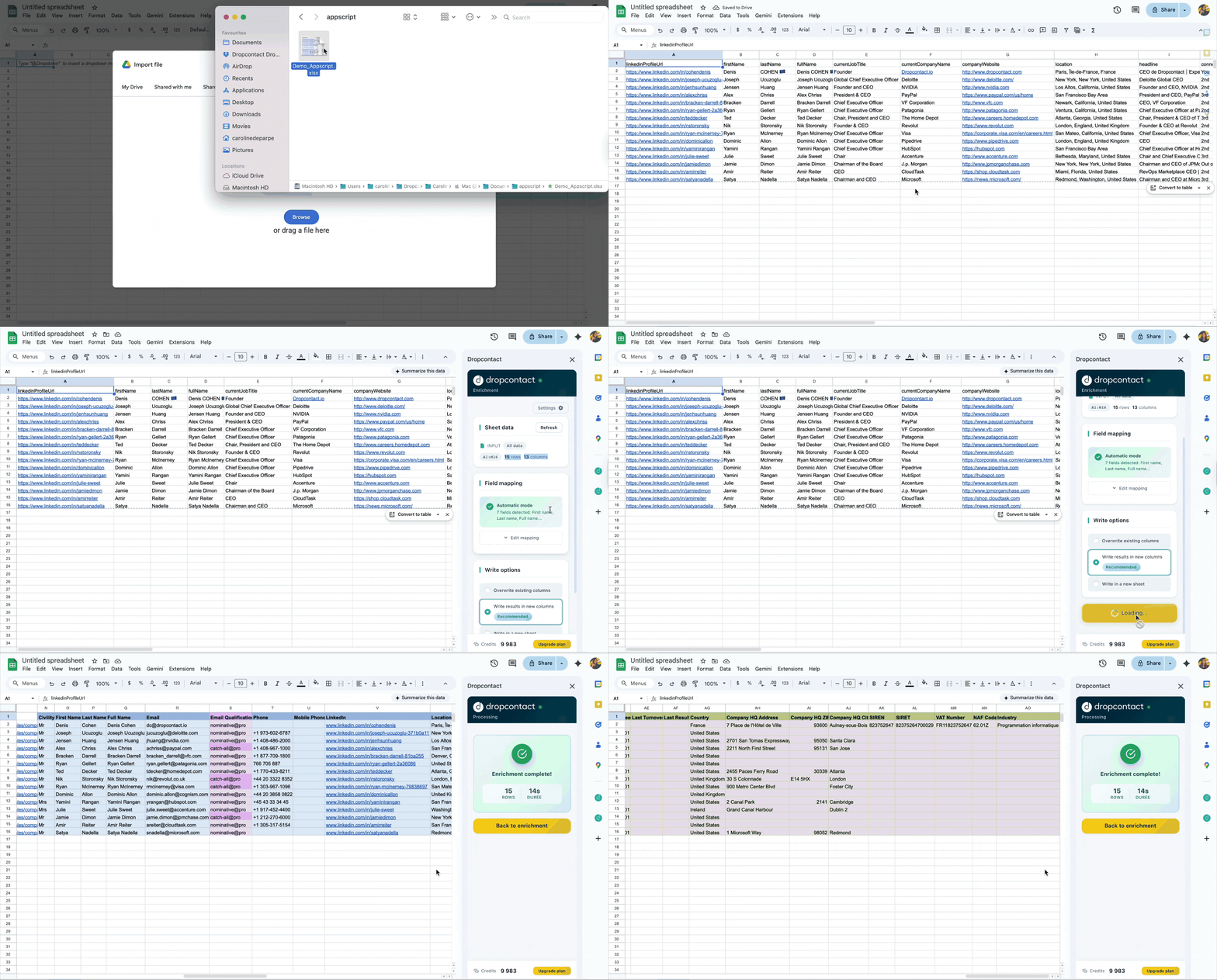
Google Sheets: Enrich contact data in real-time
Google Sheets is the easiest way to enrich your contact lists without coding. Simply paste your prospect data (first name, last name, company) into a Google Sheet, and Dropcontact automatically enriches each row with verified emails, LinkedIn profiles, job titles, and company information.
Perfect for:
- Quick data enrichment without technical setup
- Collaborative prospecting with your team
- Testing Dropcontact before building complex workflows
📘 Learn more: How to enrich data directly in Google Sheets
LinkedIn scraping tools: Find and identify your target prospects
LinkedIn scrapers extract prospect data from LinkedIn profiles, Sales Navigator searches, and company pages. Use these tools to build your initial prospect lists, then enrich them with Dropcontact to get verified emails and complete contact information.
Typical workflow: LinkedIn scraper → Dropcontact (email enrichment) → CRM or cold email tool
📘 Discover the top 10 LinkedIn scraping tools in 2026
Cold email tools: Maximize deliverability with verified contacts
Cold email platforms help you send personalized email campaigns at scale. Since Dropcontact provides verified email addresses with built-in validation, you get better deliverability rates and avoid spam folders when using these tools together.
Why combine with Dropcontact: Our built-in email verification ensures high deliverability rates. Don't re-verify Dropcontact emails with third-party tools—they often mislabel valid addresses as risky, hurting your campaign performance.
📘 Explore the top 20 cold emailing tools in 2026
CRM enrichment: Keep your contact database clean and updated
Integrate Dropcontact with your CRM to automatically enrich new contacts, verify emails, detect duplicates, and keep your database up-to-date.
Benefits: Never manually update contact information again. Dropcontact automatically enriches new leads, verifies emails, and alerts you when contacts change companies.
📘 Top 20: the best CRM in 2025
Why use Dropcontact API for B2B email finding?
100% real-time enrichment: No stale database. Every result is generated fresh using our algorithms, ensuring always up-to-date data.
No website required: Our intelligent company matching works without requiring a website URL, reducing errors while increasing coverage.
Built-in email verification included: Email verification is included automatically. No need to chain multiple tools or risk false positives from third-party verifiers.
GDPR compliant by design: We generate data in real-time without storing personal information, making compliance straightforward.
Pay-on-success pricing model: 1 credit = 1 email found or verified. If we don't find an email, you get your credit back.
Developer documentation and technical integration guide
Complete API documentation for developers
Full API documentation with endpoints, authentication, rate limits, webhooks, and code examples:
The documentation includes:
- RESTful API reference
- Authentication methods
- Request/response formats (JSON)
- Rate limits and quotas
- Webhook configuration for async processing
- Error handling and status codes
- Code examples in multiple languages
Build a Dropcontact integration for your product
Want to integrate Dropcontact's email enrichment directly into your product or platform? We support technical partnerships and can help you build a seamless integration for your users.
📧 Contact us: integrations@dropcontact.io
We'll work with you on:
- Technical integration support
- Partnership terms
- Co-marketing opportunities
- Custom solutions for your use case
Get started with Dropcontact API
Ready to automate your B2B data enrichment?
- Sign up for free and get 50 emails to test
- Grab your API key from the Integrations & API section
- Connect Dropcontact to your favorite automation tool or build custom workflows